Quackoria Play
Paper Glider
One throw. Pick the angle, pick the power, then hunt for warm air and see how far a paper plane can carry a very small duck.
Two taps and a hold. The first tap stops a sweeping gauge to set your launch angle, the second sets your power, and after that your only input is holding to push the nose down. Distance in metres is the entire score.
The counter-intuitive part — and the thing that separates a two-hundred-metre throw from a two-thousand-metre one — is that maximum power is a bad launch. The glider generates lift from forward speed, and that lift stops improving once forward speed passes a certain threshold. Stop the power gauge at the very top and you get a steep, powerful launch whose forward component is actually too slow to hold the glider up, so it arcs beautifully and then falls out of the sky. Stop it around four fifths of the way along and you get both: enough forward speed for full lift, and a high climb to spend.
Once you are flying, the glider descends roughly eight times more slowly while it is above that speed threshold than below it. Keeping forward speed up is not one factor among several. It is the game.
How to Play
- Press Launch. A blue bar sweeps back and forth — tap to set the launch angle.
- A gold bar sweeps next — tap to set the launch power.
- Once you are flying, hold to tip the nose down and trade height for speed.
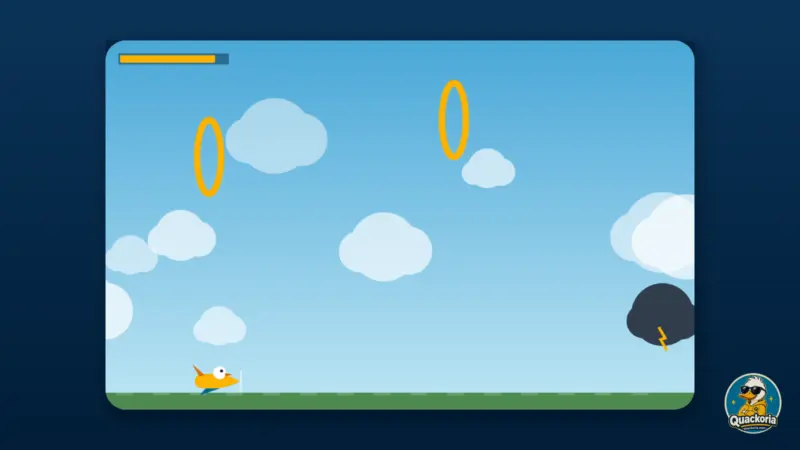
- Fly into the glowing gold circles. That is rising warm air, and it lifts you.
- You land when you touch the ground. The distance is your score.
Controls
Desktop
- SpaceSet angle, then set power
- Space or Down arrow (held)Nose down in flight
- RNew throw
- MSound on or off
Mobile
- TapSet angle, then set power
- HoldNose down in flight
- Launch buttonNew throw
Gameplay tips
- Do not stop the power gauge at the top. Maximum power comes with an angle so steep that your forward speed drops below the threshold for full lift and the glider stalls out early.
- Around four fifths along the power sweep is the sweet spot — enough forward speed to keep full lift, and nearly the steepest useful climb.
- Lift comes from forward speed and maxes out at 300. Above that you descend about eight times more slowly than below it, so protecting your speed is the whole game.
- Holding the button below the speed threshold is a good trade — it costs height but buys the speed that generates lift. Above the threshold it only costs height.
- Thermals sit in the upper half of the sky. If you fly low you cannot reach them at all, which is a second reason not to waste your launch height.
- Thermals stop appearing at about 4,300 metres. Past there it is pure glide, so the height you arrive with is the height you have.
- Do not climb into the top of the screen. Touching the ceiling cancels your climb entirely and hands back all the height you were carrying.
About the game
The score is distance and nothing else. No points for height, thermals or style.
The flight model is simple and unforgiving. Lift is generated by forward speed and reaches its maximum at 300 units; above that, your descent is gentle, and below it you fall at close to full gravity. Holding the button trades height for speed — it pushes the nose down but adds forward velocity — so used below the threshold it buys you lift, and used above it merely costs you altitude.
That makes the launch a genuine optimisation rather than a button-mash. Power rises with the gauge but so does the launch angle, and a steeper angle puts less of that power into forward speed. Somewhere around four fifths along the power sweep, forward speed is still above the threshold while the climb is near its highest. Beyond that, the extra power is wasted on an angle too steep to fly.
Thermals sit in the upper half of the sky, lift strongly and add speed, and are the main way to extend a flight. They stop appearing at around 4,300 metres, after which there is no lift source at all and the rest of the flight is a long, steady descent. There is also a hard ceiling: touch the top of the screen and your climb is cancelled outright.
Frequently asked questions
How is the score worked out?
Distance travelled, converted to metres. Nothing else scores — not height, not thermals caught, not time in the air.
Should I launch at full power?
No. The angle rises with the power, and at the top of the gauge the angle is so steep that too little of the power goes into forward speed. Around four fifths along is stronger.
What does holding the button do?
It pushes the nose down, costing height and adding forward speed. Below the lift threshold that is a good trade because speed generates lift; above it, you are just spending altitude.
Why does my glider sometimes float and sometimes drop?
Lift depends on forward speed and reaches its maximum at 300 units. Above that your descent is very gentle; below it you fall at close to full gravity.
What do the thermals do?
They lift you strongly and add forward speed. They sit in the upper half of the sky, so a low glider cannot reach them, and they stop appearing at around 4,300 metres.
Can I crash into the birds or the hills?
No. They are scenery. The only thing that ends a flight is touching the ground.
Why did I stop climbing at the top of the screen?
There is a hard ceiling. Touching it cancels your upward velocity outright, so a steep climb into the top of the screen wastes everything you had built.
Is my best distance saved?
Yes, in your own browser — but only when a flight actually lands.